A boutique owner created her Google Business Profile in January, filled in every detail, uploaded beautiful photos, and waited for customers. Four months later: nothing. Not one call from Google. The reason took thirty seconds to find: a small banner in her dashboard reading “Verify this business.” She’d skipped one step, and Google had been hiding her from every single search since.
Verification is the master switch of your entire Google presence. Until it’s flipped, nothing else you do matters: no ranking, no review replies, no posts, no insights. And in 2026, flipping it means one thing for most Indian businesses: a short video recorded on your phone, done exactly the way Google wants.
This guide covers the whole journey: what verification unlocks, the exact video walkthrough (shot by shot), the service-area business version, and what to do when verification fails or gets stuck in “pending.”
📋 Table of Contents
- Why Verification Is the Master Switch
- The Verification Methods in 2026 (And Which One You’ll Get)
- Preparing for Video Verification: What Google Wants to See
- The Video Walkthrough, Shot by Shot
- Verifying Home-Based & Service-Area Businesses
- Verification Failed or Stuck? The Fix Process
- The First 48 Hours After Verification
- The Mistakes That Get Verifications Rejected
- How RankMap Handles Verification For You
- FAQ
Why Verification Is the Master Switch
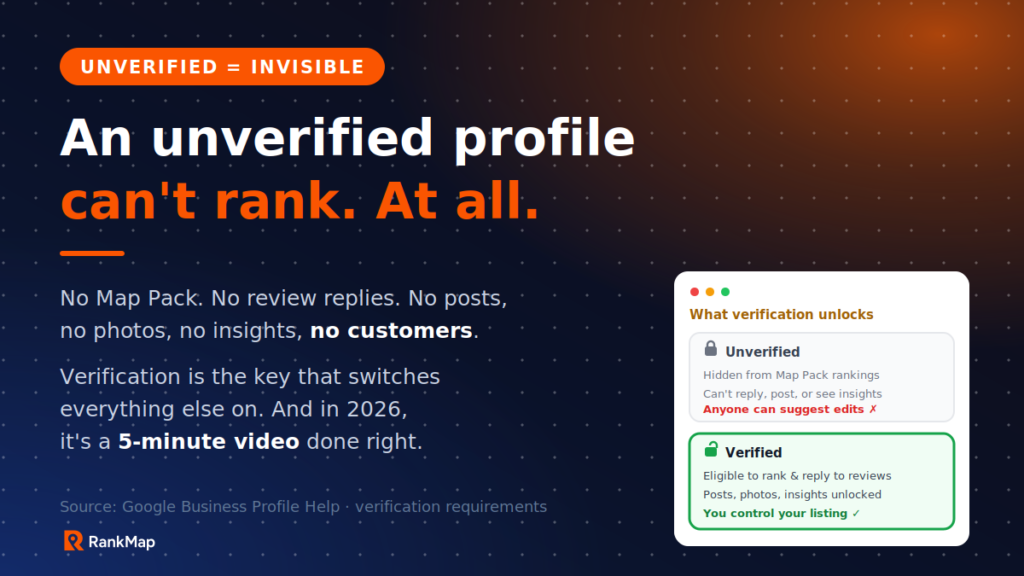
An unverified profile isn’t a weaker listing. For ranking purposes, it’s effectively no listing at all. Until Google confirms your business is real and you’re its legitimate owner, your profile is excluded from Map Pack rankings, and the management features stay locked:
- You can’t respond to reviews, so complaints sit unanswered in public (and we’ve shown in our response templates guide that 88% of consumers favour businesses that respond).
- You can’t post updates, add photos properly, or see insights, so the activity signals that drive rankings never start.
- Worst of all, anyone can “suggest edits” to an unmanaged listing, and Google often accepts them. Unverified profiles routinely end up with wrong hours, wrong categories, even wrong phone numbers, contributed by strangers.
The payoff for getting past this gate is everything we’ve covered across this blog: complete, verified profiles earn 7× more clicks than incomplete ones (Google via Searchlab), and with India adding new Business Profiles at 12% year-on-year growth, every unverified month is ground handed to a competitor who did flip the switch.
The Verification Methods in 2026 (And Which One You’ll Get)
You don’t choose your verification method; Google assigns options based on your business type, category, and region. Here’s the current landscape for Indian businesses:
| Method | How It Works | Who Gets It |
|---|---|---|
| Video recording | Record a continuous video through the Google flow showing your location, business, and proof you manage it. Reviewed by Google, typically within about 5 business days. | The default for most Indian storefronts and service businesses in 2026 |
| Live video call | A scheduled call with a Google representative where you show the same things live. | Offered as an alternative in some flows; useful if your recording keeps failing |
| Phone / SMS / Email | A code sent to your business number or email. | Increasingly rare; some established categories and chains only |
| Postcard | A code mailed to your address (2-3 weeks). | Largely phased out in India; occasionally still offered |
To start: open business.google.com, select your profile, and tap the “Verify now” prompt. Whatever methods Google offers you will appear there. Since video is what the vast majority of you will see, the rest of this guide focuses on nailing it, first attempt.
💡 One thing to know upfront: Google’s review of your video is done by humans and systems together, and per Google’s official guidance, videos must be recorded in one continuous take through their flow. Pre-recorded, edited, or screen-recorded videos are rejected automatically.
Preparing for Video Verification: What Google Wants to See
Google’s reviewers are answering three questions. Your video must answer all three, clearly:
1. “Is this business really at this location?”
- The street outside, including a street sign, nearby landmark, or neighbouring shops that place you on the map
- Your building or complex entrance if you’re inside a market or mall
2. “Is this the business claimed on the profile?”
- Your signboard, clearly readable, matching the profile name. This is the number one failure point in India: if the board says “अग्रवाल स्वीट्स” and the profile says “Agarwal Sweets,” show both the board AND something in English with the name (bill book, visiting card, printed menu) in the same take.
- The interior: shelves, products, equipment, seating, whatever makes your category obvious
3. “Does this person actually manage it?”
- Do something only an owner/manager can: unlock the shutter or door, open the billing counter or cash drawer, log into the POS, or open a staff-only area
- Backup proof on hand: GST certificate, Udyam registration, shop establishment licence, or a recent electricity bill in the business name; showing one on camera strengthens a borderline case
✅ Pre-recording checklist (5 minutes): daylight hours, signboard lights on if faded, bill book or GST certificate at the counter, phone charged with good storage, and do one silent practice walk: street → signboard → entrance → interior → counter unlock. When the real recording starts, you already know your route.
The Video Walkthrough, Shot by Shot
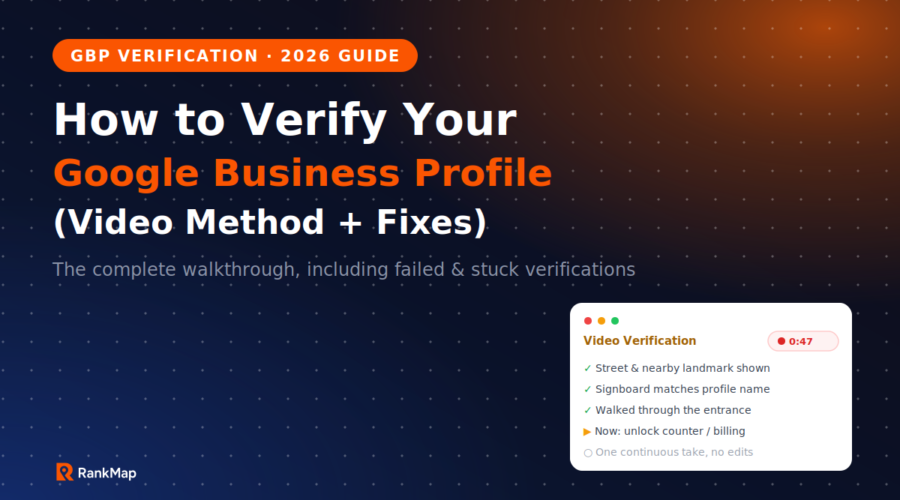
The whole video needs only 60-90 seconds. Follow this exact sequence:
- Start OUTSIDE, across the street if safe. Slowly pan the surroundings: street sign, neighbouring shops, any landmark. Hold for 3-4 seconds on anything with a readable name.
- Walk toward your shop, keeping the camera steady. Stop at the signboard and hold for a full 5 seconds. Readable beats artistic.
- Enter through the main entrance in the same take. If there’s a shutter and it’s your opening walkthrough, unlocking it here is perfect double proof.
- Pan the interior slowly: products, services area, equipment. Make your category unmistakable: a salon shows chairs and stations, a hardware shop shows stocked racks.
- Prove management: open the cash counter or drawer, tap into your POS/billing screen, or unlock the staff area. Optionally hold up the GST certificate or bill book showing the business name.
- Stop recording and submit. Do not trim, edit, or add anything. Google wants raw and continuous.
Then wait. Most video verifications in India return a result within about five business days, sometimes faster. You’ll get an email either way, and the dashboard banner will update.
Verifying Home-Based & Service-Area Businesses
Home bakers, tiffin services, electricians, tutors, freelancers: you can absolutely verify, with two adjustments.
- Set up as a service-area business and hide your home address after verification (Google still needs the address privately for the check, but it won’t be public). Define the areas you serve instead.
- Your video shows your work instead of a storefront: your equipment (oven and packaging for a baker, toolkit and meter for an electrician), your branded vehicle if you have one, business cards or pamphlets, invoices or your order book, and your GST/Udyam certificate. Record where you actually operate from.
What you must never do is borrow legitimacy: a friend’s shop, a virtual office, or a co-working address you don’t really operate from will either fail verification or, worse, pass and then get suspended later, taking your reviews down with it. If that suspension scenario is already your situation, our Maps troubleshooting guide covers the reinstatement path.
Verification Failed or Stuck? The Fix Process
Rejections and eternal “pending” states are common, and almost always fixable. Work through this ladder:
- Read the rejection email carefully. Google usually hints at the gap: location unclear, business activity unclear, or management proof missing. Your re-record should over-deliver on that specific element.
- Fix name mismatches first. If your profile name and signboard differ even slightly, align the profile to the board before re-attempting (never the other way around with a keyword-stuffed board name).
- Re-record with more evidence: longer holds on the signboard, clearer street context, and the GST certificate shown on camera. Better daylight alone fixes many failures.
- Choose the live video call option if it’s offered after failures; a human interaction resolves ambiguity that a recording can’t.
- Contact support with documents. Use the Google Business Profile support form and attach your GST certificate, Udyam registration, shop licence, or utility bill matching the profile’s exact name and address. Real documents move stuck cases.
- Stuck in “pending” beyond 10 business days? Don’t create a duplicate profile (this makes everything worse). Contact support referencing your existing verification attempt.
The First 48 Hours After Verification
Verification makes you eligible to rank; it doesn’t rank you. The moment the confirmation lands, momentum matters:
- Complete every profile field the same day: categories, description, services, hours, attributes. Our complete GBP optimization guide is the exact playbook, and completeness is worth 7× the clicks.
- Upload 10-15 real photos while your dashboard access is fresh.
- Ask your first 5-10 customers for reviews via WhatsApp using your new review link; the reviews playbook has the exact scripts and timing.
- Lock your NAP everywhere else so directories echo your now-official details; the citations guide walks the full process.
The Mistakes That Get Verifications Rejected
⚠️ 1. Paying a “guaranteed GBP verification” service. These use tricks that violate Google’s policies; profiles verified this way get suspended later, and the seller disappears. There is no legitimate paid shortcut.
⚠️ 2. Editing or splicing the video. One continuous take through Google’s own flow, or automatic rejection.
⚠️ 3. A profile name that doesn’t match the signboard. The top rejection reason for Indian shops. Align them before recording.
⚠️ 4. Recording at night with a dark board and shut shops around you. Reviewers can’t confirm what they can’t see. Daylight, always.
⚠️ 5. Creating a second profile while the first is pending or failed. Duplicates trigger suspensions and merge nightmares. One profile, fixed properly.
⚠️ 6. Virtual offices and borrowed addresses. Even if they slip through, they’re a standing suspension risk that can erase years of reviews overnight.
How RankMap Handles Verification For You
Verification is a one-time gate, but it’s also where most DIY attempts stall for weeks. RankMap gets you through it and then makes the verified profile actually perform: an AI-powered Google Maps ranking platform designed and priced for Indian businesses.
- 🎥 Guided Verification Support — we prep your profile so it passes first time: name alignment, category setup, a shot-by-shot video plan for your specific business type, and the documents to keep ready. Failed before? We run the appeal ladder with you.
- 🔧 Same-Week Profile Build-Out — the moment you’re verified, we complete every field, photo, and service so the eligibility turns into visibility. Explore GBP Management.
- ⭐ Review Engine From Day One — automated WhatsApp/SMS requests start building velocity immediately. Explore Review Management.
- 🔗 Citation Rollout — your verified NAP pushed across 62+ Indian directories. Explore Citations.
- 📍 Geo-Grid Baseline Scan — a day-one heatmap of where you rank across your city, so you can watch the climb from the very start.
- 🦾 AI SEO — your fresh profile structured for ChatGPT, Gemini and Google AI recommendations too. Explore AI SEO.
No agencies. No ₹25,000/month retainers. Check our pricing: plans cost less than one lost customer per month.
FAQ
How long does Google Business Profile verification take in 2026?
Video recordings are typically reviewed within about 5 business days, and often faster. Live video calls verify during the call itself. If your status sits in “pending” beyond 10 business days, contact Google Business Profile support referencing your attempt rather than re-submitting repeatedly or creating a new profile.
Can I verify without a signboard?
Yes, but you must compensate with other proof: your entrance and interior clearly showing business activity, plus documents on camera (GST certificate, Udyam registration, bill book, or utility bill in the business name at that address). For visible storefronts, though, even a simple printed board matching your profile name dramatically improves first-attempt success, and it helps customers find you anyway.
I verified years ago but lost access to that Google account. What now?
Don’t create a duplicate profile. Search for your business on Maps, open the listing, and use “Own this business?” to request ownership. Google contacts the current owner-account; if there’s no response within the stated window (usually a few days), you can proceed to verify your claim, often via the same video method. Documents matching the business name speed this up.
Does verification affect my ranking directly?
Think of it as pass/fail rather than a ranking boost: unverified profiles are excluded, verified profiles become eligible. Your actual position then depends on the usual factors: profile completeness, categories, reviews, citations, and activity. That’s why the first 48 hours after verification matter; eligibility plus a complete, active profile is what starts the climb.
Sources & Further Reading
- Google — Verify your business (official help)
- Google — Google Business Profile support (contact form)
- Searchlab — Google Business Profile Statistics 2026
- SQ Magazine — Google Business Profile Statistics 2026 (India growth)
Want results like these for your business?
RankMap's AI manages your GBP, reviews, and citations automatically — so you rank #1 on Google Maps without lifting a finger.